



The AI Lyric Video Maker That Turns Words Into Art
Upload your song and create a visual world around your lyrics, with the words generated inside the scenes themselves.
What Kind of Lyric Video Will You Make?
Words inside an AI-generated scene
This lyric-video workflow turns your words into part of the visual world: lettering on a wall, a sign in a landscape, or text within a surreal scene. Choose it when the lyrics should shape the art itself. The examples on this page show this approach.
Different from a conventional subtitle editor
The words are generated within images, so this workflow does not offer the font-by-font precision of a separate caption layer. Generated text can need correction or regeneration. If you need strict word-by-word karaoke highlighting or a timed-lyrics file, do not assume the lyric-video template provides those outputs.
Start on the Songs page, sign in if prompted, and upload your track. Review the extracted lyrics before selecting the lyric-video template. Generation and export use your account's available options and credits.
How our AI lyric video maker works
1. Upload your track
Upload your MP3, WAV, or FLAC. Review the extracted lyrics and correct any misheard words before creating your video.
2. Create your lyric video
Choose the lyric-video template and a visual style. Review the storyboard, where your lyrics are written into the generated images rather than placed in a separate subtitle layer.
3. Export and release
Preview the generated scenes and check the text for readability and accuracy. Refine where needed, then render using your project's available export options.
Refine every lyric video through chat
Build a cinematic lyric video for my new single with the words appearing inside a cinematic visual world.
Reviews from artists using Neural Frames
“I just created a video for a new song that comes out in a couple of months. It was like taking part in one of the most awe inspiring collaborative & after 20 years as a musician and songwriter, I believe the video might be one of the best things I've ever been involved in creating. As an artist in one field, trying to communicate in another artistic language can be almost impossible. Neural frames allowed me to surpass all of my expectations & create something visually surprising, moving, surreal and quite breathtaking. It was like working alongside an incredible artist whose fresh vision & lack of ego made the creative process like being in the presence of an enthralling and fascinating magic.”
Kirsty McGee
Singer & Songwriter“The tool I've been waiting years for, Neural Frames, has allowed me to create and share the visions I've imagined while making music. Neural Frames is truly a marvelous wonder for exploring your creativity!”
fractilian
Artist and Musician“I have been using Neural Frames for 1 1/2 years. It's been a long time, and NF has come a long way in all that time. The recent addition of Autopilot marked a massive improvement for me, as I create a lot of music, and I still want to have great videos for all of it. While I still do a lot of manual work, which can take days for a video, some of my best (and best-performing) ones were done with Neural Frames Autopilot in a very short time.”
Sandrom
Musician & Visual ArtistDiscover what others are creating
Browse community-made lyric visuals and see how words become part of the generated scenes. Review examples for the style and readability you want before creating your own video.
- AI lyric video example 1: AI lyric video scene of a horned armored warlord with glowing red eyes in a snowy landscape, with burning orange lyrics 'the stalking beast is near'
- AI lyric video example 2: Futuristic aircraft beneath a colorful night sky above a runway
- AI lyric video example 3: Synthwave AI lyric video scene with a crystalline ballerina on a neon purple grid and the lyric 'Ballerina cappuccino, track-track-pack'
- AI lyric video example 4: Man standing beneath a burning piano in a dark cinematic scene
- AI lyric video example 5: Gothic AI lyric video backdrop of pink peonies blooming among thorns and antlers in a dark forest, framed for on-screen typography
- AI lyric video example 6: Fashion portrait against a vivid red studio background
- AI lyric video example 7: Sepia AI lyric video frame of a silver sapling rising from cracked soil with the hand-drawn lyric 'This is why you're born'
- AI lyric video example 8: Low-angle fashion shot of a performer framed by city skyscrapers
- AI lyric video example 9: Surreal AI lyric video scene of a crashing wave built from rusted metal cubes with the lyric 'fighting for attention in a digital ocean'
- AI lyric video example 10: Cinematic scene of a man running beside cars at night
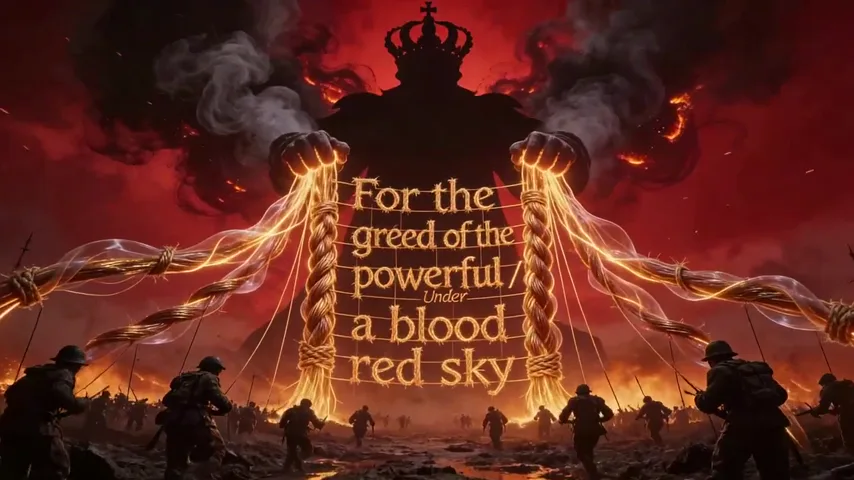
- AI lyric video example 11: Wartime AI lyric video scene of soldiers charging under a blood-red sky and a chained fire-crown, overlaid with the lyric 'For the greed of the powerful'
A wide range of lyric video templates
Need a full release edit? Start with our AI music video generator. Need reactive backgrounds behind your lyrics? Use our music visualizer.
Lip Sync Video
Lyric Video
Dance Video
Custom Style Video
Features of our AI lyric video maker
Upscale & Beyond
Cinema-quality renders, export-ready for TikTok, YouTube & Reels.
Full-length videos
Full-length lyric videos or short social cuts. No stitching needed.
Your AI Lyric Video Superpower
Review the lyrics, choose a visual style, and refine your storyboard before rendering.
Smart Lyrics
We visualize your lyrics with AI, interpreting what to show and how to animate it.

Music creators worldwide trust us
2M+
Videos created on Neural Frames
40K+
Artists and musicians onboard
1B+
Frames generated by our AI engine
Appeared on







Extensive tutorials on YouTube
Frequently Asked Questions about our AI lyric video maker
How does Neural Frames' AI lyric video maker actually work?
Upload your song, review the extracted lyrics, and choose the lyric-video template. Neural Frames generates keyframe images with words integrated into the scene, then animates the visuals around your song. This is an artistic in-scene text workflow, not a conventional subtitle overlay. Review the storyboard and generated text before rendering.
What if the AI transcribes a lyric incorrectly? Can I edit the text?
Yes. You can review and edit the extracted lyrics on the song before creating your video. Distortion, layered vocals, ad-libs, or unfamiliar words can affect transcription, so check the text carefully. Also review the generated images: correcting the source lyrics does not guarantee perfectly rendered text in every scene.
Can I pick an exact font or get karaoke-style highlighting?
This template generates text as part of the artwork instead of placing editable text boxes over a background. Your visual style and scene prompts guide the result, but it is not designed for exact font selection or conventional word-by-word karaoke highlighting. Preview the examples to decide whether this creative approach fits your release.
Can I control the visual style and keep characters consistent?
Absolutely. You have complete creative control over what the AI generates. You can select from various visual styles or upload your own reference images to guide the aesthetic. If your song tells a specific story, you can even lock in consistent characters so the same persona appears throughout the entire lyric video.
What should I check before exporting my lyric video?
Watch the preview with your song and check spelling, readability, scene changes, and the project format. Export choices depend on the project and available account options. Plan your destination format before generation; a finished lyric video is not automatically a platform-specific short or a Spotify Canvas loop.
Does the AI lyric video maker work with non-English songs or fast vocals?
You can upload songs in different languages and vocal styles, but transcription and generated lettering quality can vary. Fast vocals, layered voices, and unusual spelling need especially careful review. Correct the extracted lyrics and inspect the generated scenes before committing to a final render.
What audio file formats can I upload?
You can upload MP3, WAV, and FLAC audio, including an exported song from Suno or Udio. Start with the audio file rather than a share link. Use a song you have permission to upload and publish, and check the extracted lyrics before generating visuals.
Can I use my own album art or reference images to guide the video's look?
Absolutely. While our AI is incredible at generating original scenes from text prompts, we know artists have specific visual identities. You can upload your own album cover, character photos, or aesthetic reference images. The AI will use these cues to generate the lyric keyframes, ensuring the final animation perfectly matches your existing brand and vision.
Do I need video editing experience to use this?
You can begin without traditional video-editing experience. Upload your song, review the extracted lyrics, choose the lyric-video template, and describe your visual direction. The storyboard gives you a chance to inspect and refine the scenes before generating the final video.