

How to Make a Music Video in 2026: Step-by-Step Guide (With AI)
To make a music video, you need three things: a clear concept for your song, visuals for every section of it, and an edit that follows the music. In 2026 there are three ways to get those visuals: film them, build them from existing footage and artwork, or generate them with AI.
This guide covers the steps every music video needs, then walks through the fastest route: an AI music video made from a finished song with Neural Frames Autopilot. If you would rather shoot it, the traditional workflow is further down.
Last updated November 2026. Interface names and prices change, so check the app and our pricing page for current details.
Key takeaways
- Short answer: pick where the video will be watched, write a concept, create the visuals, check them, then export and release. With an AI music video generator, the whole process starts from one song upload.
- Fastest route: upload your song to Autopilot, review the storyboard, check the starting images, then render. Neural Frames is free to start with no credit card; paid plans add longer renders, stem-based audio reactivity and watermark-free downloads.
- Check the starting images before you render. The Autopilot handbook warns that once you start generating, you cannot pause or cancel it (Help Center).
- Match the format to the destination: 16:9 for YouTube, 9:16 for Shorts, Reels and TikTok, and short vertical loops for Spotify Canvas.
- Disclose realistic AI. YouTube requires a label for realistic AI-generated or altered content, and for AI-generated music (YouTube Help).
What you need before you start
- A finished song. Autopilot reads your audio and lyrics, so use your final mix if you can.
- A destination. Decide where people will watch it: a full video on YouTube, a vertical clip for Shorts, Reels or TikTok, or a Spotify Canvas loop.
- A rough idea of the story or mood. It does not have to be detailed. Neural Frames can write a concept from your song if you leave the field blank.
- The rights to the music. You own the videos you make with Neural Frames, but you are responsible for having the rights to the audio you upload (Neural Frames FAQ).
Three ways to make a music video
| Method | What you need | Works best for |
|---|---|---|
| Film it | A camera or phone, performers, locations, editing software | Band and performance videos, personal stories |
| Edit existing material | Footage, photos or artwork, plus an editor or a visualizer | Simple lyric videos and visualizers |
| Generate it with AI | A song and a concept | Story videos, lyric videos, vocal videos, any video without a shoot |
Many releases mix methods, for example AI-generated story scenes plus a few clips of the artist filmed on a phone. The step-by-step section below uses AI because it is the quickest way to a finished video. The traditional route is covered after it.
What Neural Frames data says about music videos in 2026
We looked at our own product data and at a survey of our users. The survey is self-selected: 252 Neural Frames users answered between October 22 and November 26, 2026, and most were over 45. Read it as what Neural Frames users do, not as what all musicians do.
- Length: in the 90 days to late November 2026, about 79% of storyboards were for audio longer than one minute. The most common length was 3 to 4 minutes (26.4%), and about 21% were clips of 60 seconds or less (137,474 storyboards).
- Scenes: the median storyboard has 10 scenes (289,172 storyboards).
- Technique: 65.7% of selections were Classic Video, 22.4% Vocal Video (lip-sync) and 12.0% Lyric Showcase (147,386 selections).
- Vertical video: 9:16 made up 17.0% of exports, and its share rose from 14.8% in January to 18.5% in November 2026 (36,825 exports).
- Survey: 71% say they make AI videos mainly to promote their own music, 46% create their track with an AI music platform such as Suno, and 65% spend more than 20 minutes writing the video concept.
What to take from this: most people make full-length videos of several minutes, so plan for dozens of scenes rather than a single clip, and put your effort into the concept.
How to come up with a music video concept
A concept is what separates a video people watch from a slideshow. Berklee's music marketing guide suggests three exercises for finding it (Berklee):
- Close-your-eyes visualization: listen to the song with your eyes closed. Where does it take you? What lighting, colors, locations or movement come to mind?
- A mood board: collect 8 to 10 images that capture the vibe of the release, such as photography, fashion, color swatches or film stills.
- A video treatment: write it as if you were pitching your song to a director. Is there a story, a mood or a recurring visual motif?
Then turn the answers into a plan:
- Song analysis: Listen closely to the music and let the emotions guide you through different possibilities for imagery or narrative. What is the song about and how will the video draw that out for the target audience?
- Choosing a narrative or theme: Will your video tell a linear story with traditional characters and narrative arc, or is it more poetic and experimental? This is the phase where you lock in the high-level concept of the video, before figuring out all of the details.
- Storyboarding: Once music video’s concept is clear, sketch out the most important shots and scenes in a storyboard. You can use an AI image generator to create the images if you don’t have a concept artist available to help you. Your text-to-image prompts can include details about the lighting and angles. Seeing the ideas laid out in a visual format will help later when it’s time to begin creating your video content.
When generating your shot list, it’s a good idea to line up ideas for b-roll footage that you can splice in between the most important moments. Footage of landscapes and ambient scenes will help set the mood for your video, even if they don’t contribute directly to the narrative.
For more ideas, see our list of 99 music video ideas.
How to make an AI music video with Neural Frames, step by step
This walkthrough follows Autopilot, the Neural Frames workflow that turns a song into a complete video. The Help Center handbook describes its four stages: Music, Track, Storyboard and Video. In the video below, our founder makes two music videos with Autopilot from start to finish.
Step 1: Upload your song
On the Music page, choose Upload Music and pick your file. Neural Frames accepts MP3, WAV and FLAC files and transcribes the lyrics automatically.
Made your track in Suno? That works as well, see Suno to video. Check your Suno plan first: according to our FAQ, tracks from Suno Pro and Premier plans carry commercial rights, while free-tier tracks are non-commercial.
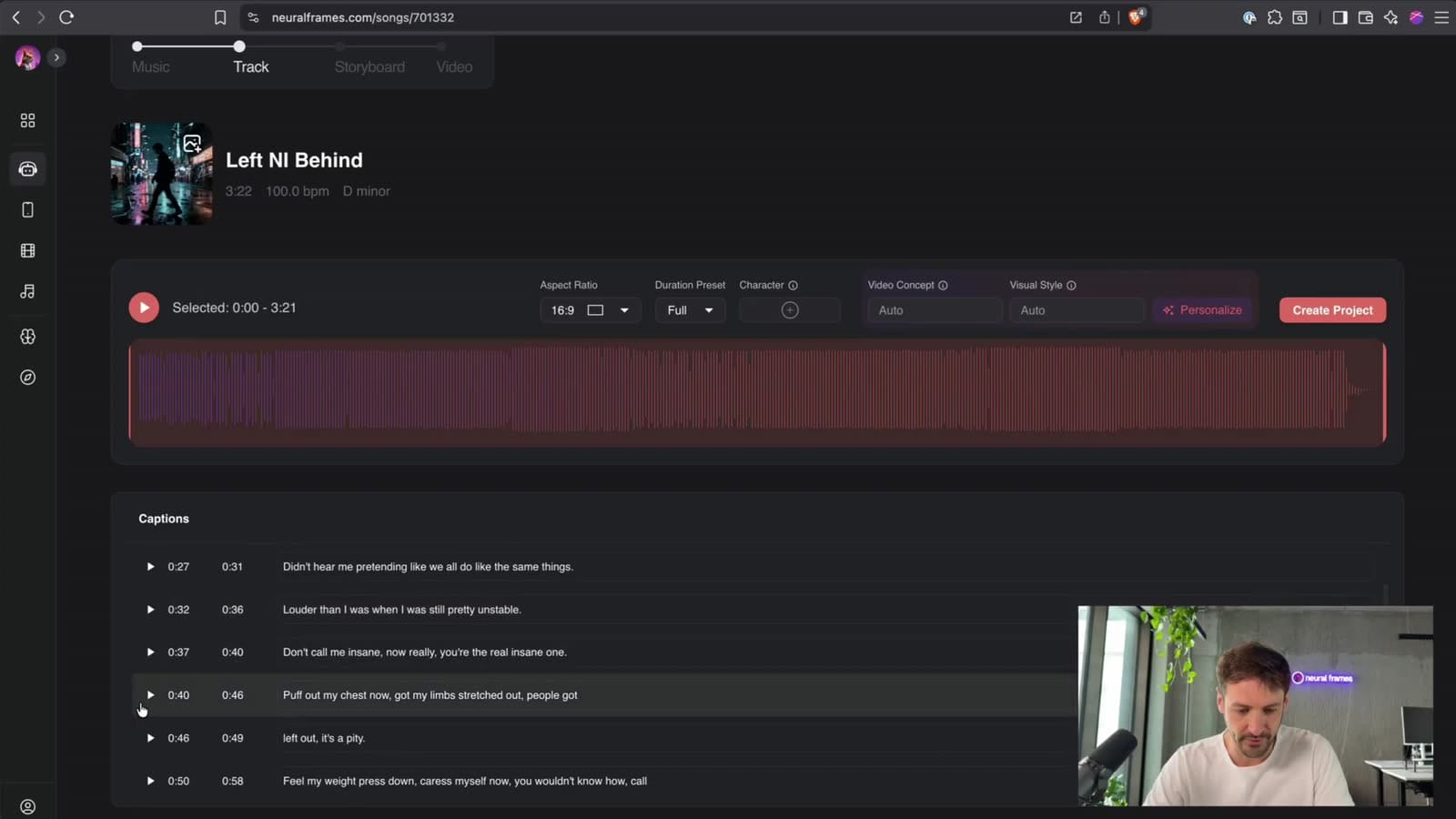
Step 2: Set the length and format on the Track page
The Track page shows your waveform, lyrics and a settings bar. Set these three things first:
- Duration: click and drag on the waveform to pick the exact section, or choose a preset made for social media (Help Center).
- Aspect ratio: choose 16:9 widescreen for YouTube or 9:16 for TikTok, Reels and Shorts. Square and vertical YouTube videos up to three minutes long now count as Shorts (YouTube Help).
- Lyrics: read the transcription while the song plays and fix any wrong words or timings in the lyric editor. This matters most for lyric videos, because the lyrics and their timing build the video.
Step 3: Describe the video, or leave it blank
The Video Concept box is where you describe the story, the subject, the scenery and the style. Write anything you like and the AI reads all of it. If you leave it empty, Neural Frames writes a concept from your song.
- Exclude things by typing
NO:and the subject, for exampleNO: Animals. - Add up to three characters. Upload photos of yourself or a band member, or describe a character in text. See character-consistent music videos for how this works.
- Pick a visual style. Choose a preset, or one you trained yourself. The handbook's tip for the most realistic look is to choose the Default style.
- Personalize lets you upload up to four images to use as a style, a concept, or both.
Be concrete in the concept. Name places, objects and lighting rather than only moods. More tips are in our guide to 10 ways to make better AI music videos.
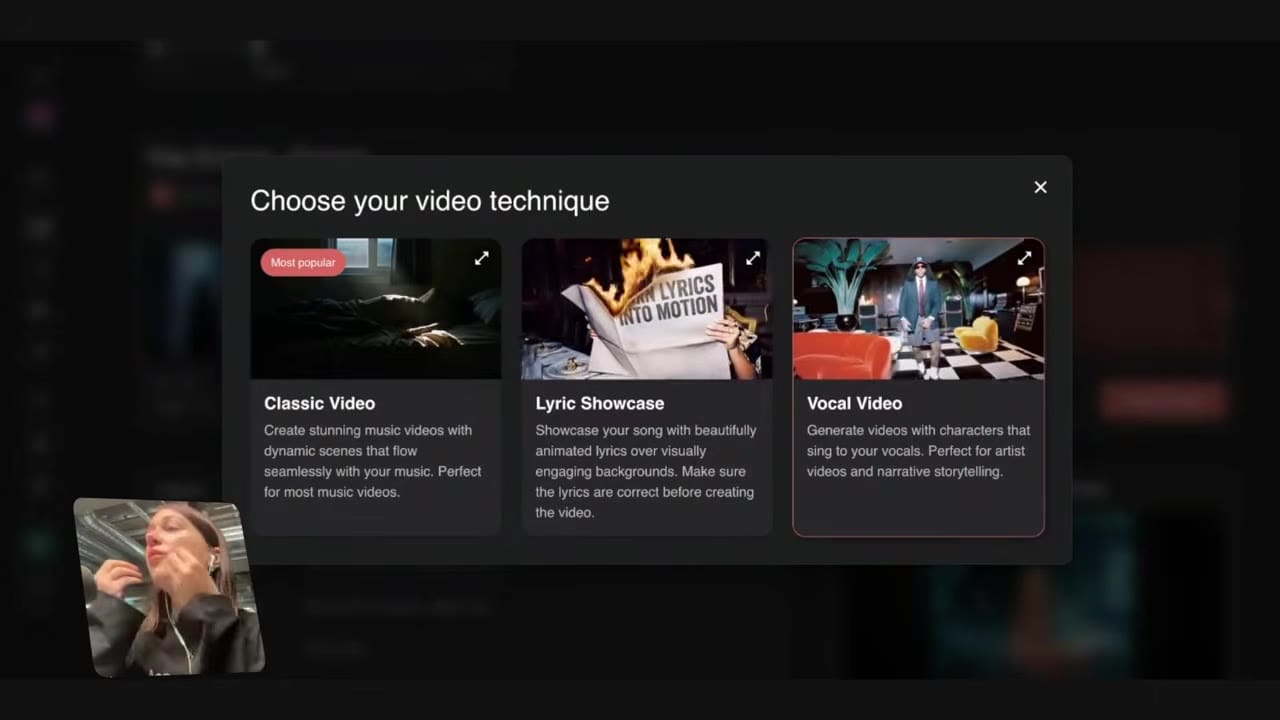
Step 4: Pick a video technique
Click Create Video and choose a technique:
- Classic Video is the default. You can add cuts, blends and lip sync to individual clips after the starting images are made.
- Lyric Showcase highlights the most meaningful moments of your lyrics. See how to make a lyric video with AI.
- Vocal Video has your character sing along in specific scenes. See how to make a lip-sync AI music video.
Step 5: Read the storyboard and choose a video model
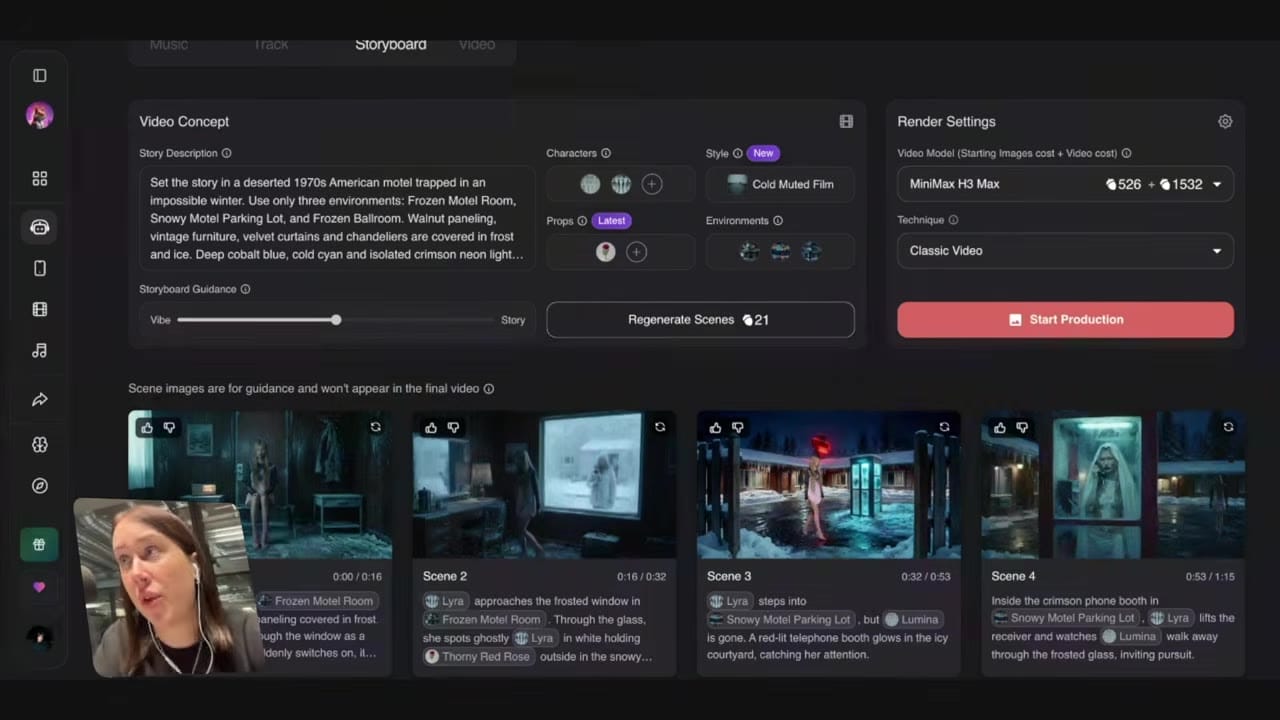
The storyboard turns your concept into scenes. Read them to check that the story works. The scene images are a guide and are not used in the final video. If you change the concept, style or character, click Regenerate Scenes so the scenes follow your changes. A Vibe slider controls how closely scenes follow your story.
Then choose a video model. Each option shows a keyframe cost and a video cost, and the total is the two added together. The total depends on your song's length, the number of clips and the model you choose. To compare, use the calculator on our pricing page, and read how to pick the right image model if you want to choose the image model yourself.
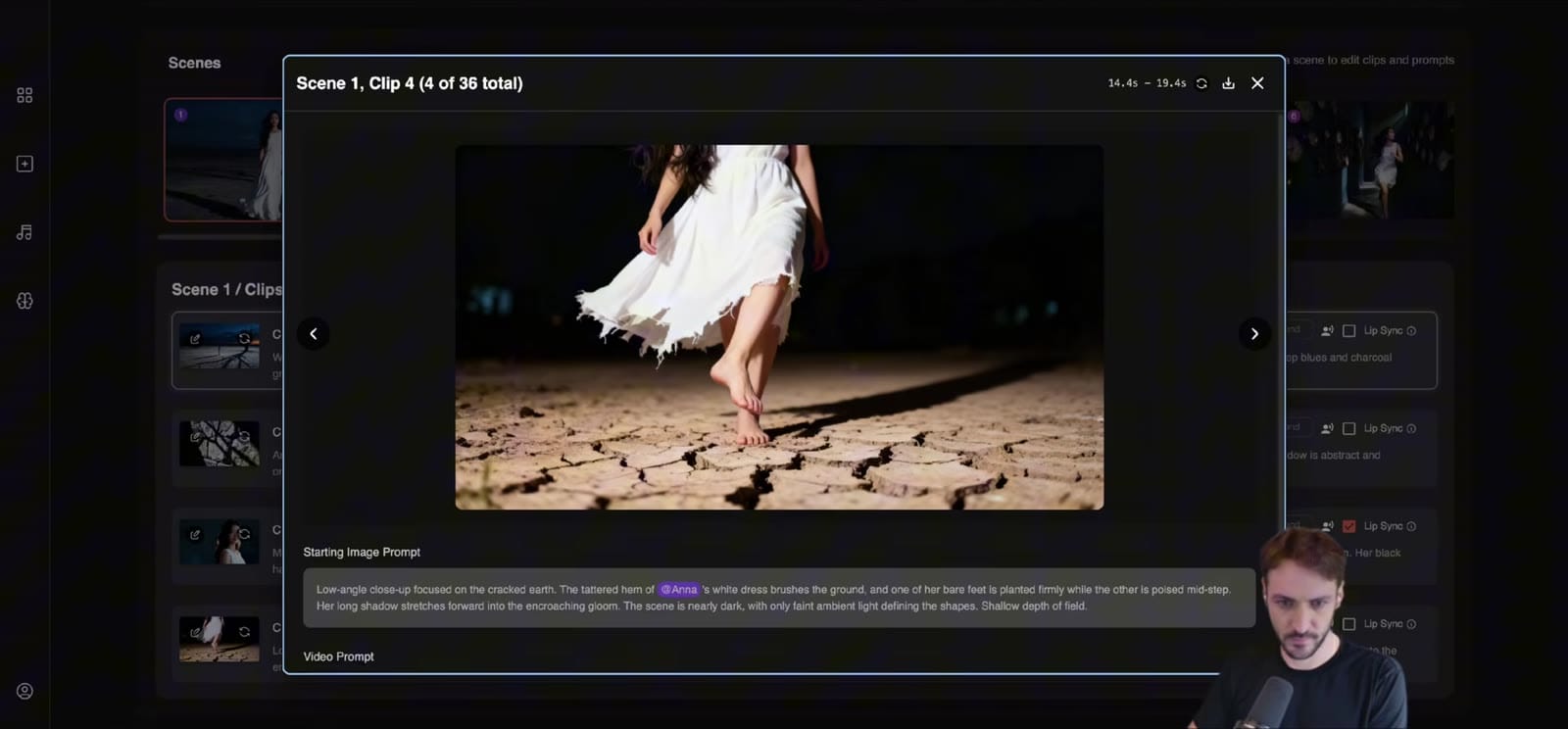
Step 6: Generate and review the starting images
In the Create Video menu, generate the starting images (keyframes) first. This takes a little extra time, but it lets you check every image before you pay for motion. The handbook recommends it because the video animates from these images and lets you fix them up front, which can save credits later.
For each clip, check that the right character is in the right scene and that the image looks the way you want. You can ask the chat tool to change an image in plain language, or re-prompt it. You can also edit the motion prompt, for example to move the camera from left to right.
Step 7: Render, download and check
Once the starting images look right, create the video. After this point you cannot pause or cancel the render. When it finishes, click Download to get the direct 1080p file or an enhanced 1080p version. Neural Ninja and Neural Nirvana plans can also upscale to 4K, which usually takes about 10 minutes.
Watch the whole video with sound before you publish it. If one clip is off, open it and adjust its prompt; our lip-sync guide shows an example.
Want more control? Use the frame-by-frame editor
Autopilot is the quickest way to a finished video. If you want to shape every moment, Neural Frames also has a Frame-by-Frame Editor and a Text-to-Video Editor with a timeline. They take longer, but give you direct control over prompts, timing and visuals.
The frame-by-frame editor is also where the audio-reactive effects live. Neural Frames splits your track into eight stems (drums, bass, vocals and more) and lets you link visual effects to them. Pick an instrument with clear hits, such as a kick drum or snare, then set modulations that zoom, rotate or shift the image whenever it hits. That keeps music and visuals tightly in sync. Our audio visualizer page explains it further.
The video below, one of our most-watched tutorials (67k views), shows the basic steps: make the first frame, upload a song, then add prompts and render. It was recorded in an earlier version of the editor, so buttons look different today, but the basic workflow still applies.
How to shoot a music video the traditional way
Most of the traditional techniques still apply when you make a video with AI, especially the concept work above. If you plan to film, here is what the process involves.
1. Choosing your equipment and software
In a traditional video shoot, production value is closely tied to budget. Teams with more money can afford to rent or buy better equipment, film for longer and hire a bigger crew. Making videos with AI needs far less: with a cloud-based service like Neural Frames, you only need an internet connection and a web browser.
Here’s a quick overview of the equipment that would have gone into making a music video:
- Video camera and lenses: Cinema cameras (e.g., ARRI Alexa, RED DSMC2, Sony CineAlta) boast higher dynamic range and resolution, while cheaper DSLR and mirrorless cameras (e.g., Sony Alpha A7 III, Blackmagic Pocket Cinema Camera 4K) have lower image quality and fewer customization options. Low budget content creators sometimes use Apple iPhones.
- Good lighting: The atmosphere of a space is greatly influenced by lighting. LED lights are an excellent choice for a vibrant and dynamic feel, while tungsten lights create a cozy and intimate ambiance. Conversely, fluorescent lights evoke a cold and sterile mood, so they would only be used when aiming for that aesthetic.
- Audio equipment: Some music videos include interludes not part of the original track, like dialogue or a moment of live performance from the band. Crew sometimes need microphones for vocals and live instruments, a mixing console, audio interfaces, cables, headphones, and a monitoring system for playback.
If you plan on making additional change to the video footage in post-production, it will be helpful to have video editing software like Adobe Premiere Pro, Da Vinci Resolve, iMovie, or Final Cut Pro.
Artists with programming chops have also been generating AI music videos locally on their computer. There’s a high cost associated with obtaining the graphics cards and memory required to run AI video generation locally.
2. Shooting your video
Making music videos is a collaborative process with many moving parts. Large productions need big crews. Directors and producers scout locations beforehand and pay for permits or rentals so everything is available on the day of the shoot.
When it’s time to start rolling the camera, skilled directors will already have their shot list and angles prepared. They work hard to build rapport with their talent to make sure they can get the performances they need, without conflict or misunderstanding.
Videographers should be skilled in cinematography and adept at capturing both close-ups and wide-angle shots. Varied camera angles add visual interest and keep viewers engaged.
3. Editing your video
Whether you shoot or generate, the last stage is the same: assemble, grade and polish.
Post-production: editing and polishing your music video
Traditional video post-production tasks like color grading and visual effects can add a lot of value to AI generated video content. Whether you’re shooting live video footage or generating it with AI, you’ll need to have a video editor like Adobe Premiere to do post-production. Here’s an overview of some important things to consider.
- Video editing: To get started, drag your video and audio assets into the editing software. You’ll construct the final video on your timeline before getting into effects. Adobe Premiere offers stock video templates that can help guide this process.
- Effects and transitions: Add transitions and special effects to enhance specific moments and maintain flow between shots and scenes. Traditionally this is where imagery would be swapped in for green screens.
- Syncing sound effects, music, and visuals: As covered above, AI video generation can help you to automatically sync music and visuals through effect modulation. If band members decided to lip sync their lyrics, this is the phase where you would line that footage up with the song. You might also add text overlays for lyrics videos.
- Color grading: Even with AI video generation, post-production treatment of the color grading and tone will enhance the visual appeal of the finished content.
If you're new to creating videos and don't want to spend time learning post-production, consider using a freelancer platform like Upwork or Fiverr. You'll find affordable contractors on these sites who can help fine tune your work.
Publish and release your music video
- YouTube: upload the full video to your artist channel. For realistic AI visuals or AI-generated music, answer the AI disclosure question in YouTube Studio (YouTube Help). Stylized or non-realistic animation generally does not need the label, but read the rules for your case.
- Shorts, Reels and TikTok: cut a vertical version. Our guide to short-form music videos with AI shows how with Short-Form Studio.
- Spotify Canvas: a Canvas is a looping clip of 3 to 8 seconds, in 9:16 and between 720 and 1080 pixels tall, as an MP4 or JPG (Spotify). Our Spotify Canvas maker makes one for you.
- Spotify video pitching: Spotify lets you pitch an eligible official music video to its editors if it is unreleased or was released in the past 7 days. Video pitching is still rolling out, so check Spotify for Artists (Spotify).
Releasing the video is only half the work. Read how to promote your music for the next steps.
Which AI music video generator should you use?
It depends on the kind of video you want. For a full-length story video, start with the Neural Frames AI music video generator. For text on screen, use the lyric video maker. For beat-reactive loops and bars, use the audio visualizer. If you want to compare tools, read our 10 best AI music video generators and our comparison with Freebeat.
FAQ
How do you make a music video?
Choose where it will be watched, write a concept for your song, create visuals for each section, then edit them to the music and export. You can film the visuals, build them from existing footage, or generate them with an AI music video generator such as Neural Frames.
How do you make a music video for free?
Neural Frames is free to start with no credit card: you can upload a track, use the full frame-by-frame editor and preview your video. Paid plans add longer renders, stem-based audio reactivity and watermark-free downloads. If you film instead, a phone and a free editing app are enough to start.
How do you make a music video with AI?
Upload your song to an AI music video generator, describe the video or let the AI write a concept, check the storyboard and starting images, then render. Our step-by-step walkthrough above shows each stage in Neural Frames Autopilot.
Can ChatGPT create a music video?
ChatGPT can help you write a concept, a treatment and scene descriptions. To turn a finished song into a video that follows its beat, lyrics and structure, use a dedicated music video generator. Neural Frames analyzes your track, so scenes and effects follow the music.
How long does it take to make a music video?
With Autopilot, the generation itself takes minutes, and 4K upscaling usually takes about 10 minutes. Most of your time goes into the concept and reviewing the starting images: in our survey, 65% of respondents spend more than 20 minutes writing the video concept. A filmed video takes much longer, because of planning, the shoot and editing.
How much does it cost to make a music video?
With AI, the cost is the starting images (keyframes) plus the video render. It depends on your song's length, the number of clips, and the image and video models you choose. The storyboard shows both figures and adds them together. As of November 2026, Neural Frames plans start at $26 a month billed yearly, or $39 a month billed monthly, and the pricing page has a calculator for your song. A filmed video adds the cost of crew, equipment and locations.
How long should a music video be?
As long as the song, in most cases. In the 90 days to late November 2026, about 79% of Neural Frames storyboards were for audio longer than one minute. For Shorts, Reels or TikTok, make a separate vertical clip from the best section of the song.
What format should a music video be?
Use 16:9 for YouTube and 9:16 for Shorts, Reels, TikTok and Spotify Canvas. Vertical is growing: 9:16 made up 18.5% of Neural Frames exports in November 2026, up from 14.8% in January.
Do I have to label an AI music video on YouTube?
YouTube requires a label when realistic content is AI-generated or altered, and when AI-generated music is the focus of the video. It does not require one for clearly non-realistic content, such as fantasy animation. See YouTube's disclosure rules.
Do I own the music video I make with Neural Frames?
Yes. You own the videos you create and can publish, monetize and use them commercially. You are responsible for having the rights to any music, images or footage you upload.
How do I make a music video on my phone?
You can film vertical video on a phone and cut it in a mobile editor. Or use a browser-based generator like Neural Frames, which only needs a web browser and an internet connection.
Make your first music video
Upload a song and see what Autopilot builds. Start free with Neural Frames, or watch more tutorials on our YouTube channel.